Magma High Availability
Last updated at 1:53 am UTC on 20 June 2013
High-Availability
Introduction
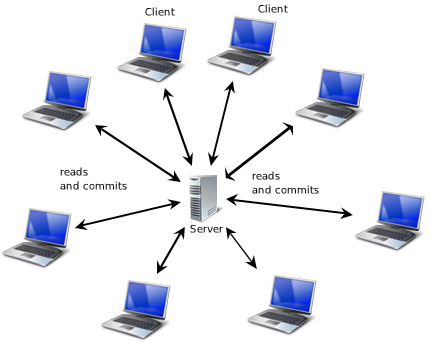
Prior to release 1.0r42, Magma could utilize just one server to support many clients. If something happened to the server, clients would not have access to the repository until the server component was manually restarted.
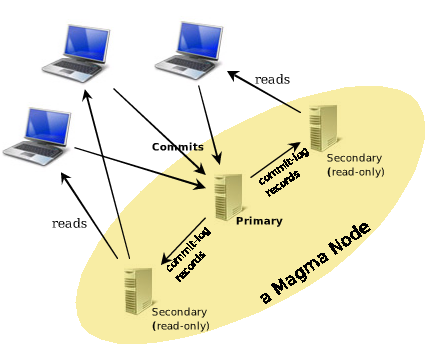
Release 1.0r42 of Magma introduces high-availability and improved read-scale. By running multiple servers, each with its own redundant copy of a single repository, uninterrupted access, 24x7x365, across power and hardware failures of individual servers, is available. Redundant copies can be added (or subtracted) dynamically to adjust read-scale and fault-tolerance as needed. Repositories can be "moved" from one physical data-center to another without ever bringing the system down.
Introducing MagmaNode
One logical repository can now be hosted by multiple physical servers. A MagmaNode defines one "logical server" for one logical repository. It is merely a list of MagmaRemoteLocations referring to the redundant servers that make up the Node. Communications between the servers of a node are done by sending serialized binary request and response objects over TCP/IP, in order to keep all copies in-sync.
Note: For best performance, server configurations focused on improving scale should have fast network access (i.e., >= 100Mbps) between the servers of a Node.
Architecture
Magma users are familiar with the "root" of a repository. But the #root refers actually only to the users domain root. The actual root of every repository is the #anchor, an instance of MaAnchor, which holds the domain 'root' as well as the repository 'definition'. This object contains meta-information about the repository which is updated via transactions. Generally, users should not directly commit changes to any objects outside the domain root, but Magma does allow limited meta "attributes" to be arbitrarily specified by the user.
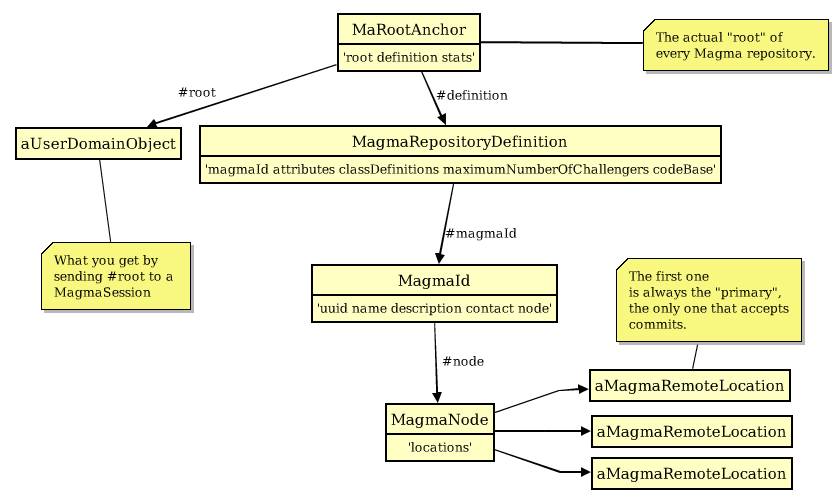
MagmaRemoteLocations have always been able to be thought of as a "bookmark" object to any Magma repository and this is still true; to connect to an entire node requires clients to merely connect to any servers of that node.
When a server in the node fails, Magma commits a change to the MagmaNode, removing that server from the node. Likewise, when a server "joins" (see Starting the Backup below), Magma commits a change to the node that reflects the newly added server.
Getting Started with High-Availability
High-availability is achieved by starting one or more secondary-servers on a model backup of the repository.
An model-backup can be obtained by:
myRepositoryController modelBackupTo: aFileDirectory
Note, "aFileDirectory" may also be a ServerDirectory (FTP). The model-backup runs in a forked Smalltalk block which will tax the server while files are copied individually to the specified target. For consistency and safety, the repository files are in read-only mode for the entire duration of this copy. The copied target therefore represents a snapshot of the repository as of a single point in time.
Read requests continue to be processed normally, they are able to read the files while they're being copied. Commit operations are flushed to the commits.log file (as well as remaining buffered in memory) until the backup completes. Normally, Magma only buffers five seconds worth of changes before flushing, but a model-backup forces it to wait the entire duration of the file copy before flushing the commits.log contents to the actual repository files.
Once the model backup is started, its status may be interrogated with:
myAdminSession isModelBackupRunning
High availability is achieved by copying these files to other machines on the same network and starting a Magma server process on each one.
Restore Mode
The backup files are identical to the original repository files except for one bit; the #restoreMode bit is set in the backup. #restoreMode is one of the "primitiveAttributes" of each repository, meaning it is written in the header area separately from the persistent object model.
A repository with the restoreMode bit set operates identically to its original copy except commits are not permitted. To keep the repository consistent with the original, the only writes permitted are from actual commit-log records from the original primary repository, applied in sequence, to "roll-forward" the backup. When servers are started on the backups, each backup server process will "catch itself up" to the primary node automatically and, once it does, will, under ideal conditions, stay within one or two seconds of the primary server.
Increased Read Scale
That the warm-backup should merely provide rapid-failover would be a waste of resources. Why not put those machines to work?
In any node, only one single VM process ever accesses a single copy of the repository files at a time.
Connecting to a node can be accomplished by simply making a connection to any one of the servers in the node. But the result of making any connection to a node is that the client will be connected to one server for reads (a secondary), and another server for commits (the primary). Based on the server location clients initially connect to, the server to use for reads is chosen (if the initial connection is made to the primary then a random secondary is chosen). Commits will always go to primary, reads are always from the selected secondary.
The Process of Joining a Node
When a Magma server is started on a model-backup, Magma handles the process of joining the Node automatically, but it might be interesting to know it happens in two stages. The first stage, the backup requests globs of CommitRecords from the server and applies them to its local copy of the repository. During this period, it is not part of the Node, it is catching itself up.
The primary server will know when a secondary that is catching itself up has requested the last glob of commit-records. Upon sending that glob back in response, it also commits a change to the MagmaNode that includes that secondary server.
The primary server broadcasts, asynchronously, each commit-record it receives to each secondary listed in the Node, which now includes the newly-joined secondary. It does this, in fact, even before writing and flushing the commit to its own local commits.log file, that each secondary can stay as up-to-date as possible.
Even still, secondary's utilize a built-in mechanism for re-syncing themselves if a commit-log is received out-of-sequence, which can happen during heavy commit load.
Client Handling
At this point, load-distribution is split between two servers. Read requests are handled by the secondary's, commits are handled by the single primary. In this configuration, it may be possible for an application to occasionally find the secondary read-servers slightly 'behind' the primary server. Applications may adjust their tolerance for domain latency via #requiredProgress:, ensuring purely-synchronized activity. To use it, applications merely specify the minimum commitNumber a read-server must be at before it will attempt to process ReadRequests from that client. If it is behind, the client will delay 1 second and retry once.
mySession requiredProgress: theMinimumCommitNumber
High-Availability
A secondary failure will not noticed by applications and does not need to be handled (sans any notifications that may be needed), because other secondary's or the primary will silently step in. However, applications still need to handle NetworkError for commits (sent to the primary). Since the Magma server broadcasts commit-log records asynchronously (for maximum performance), it doesn't know whether secondary's are still there. To know that, it relies on clients who attempted and failed to access them to complain.
Likewise, if a secondary receives a CommitRequest, it will ping the primary server defined in the Node. If it is still reachable it signals the MagmaWrongServerError, otherwise updates the Node and instructs the second (in case there are more than one read-server backup) location in the Node to become the primary.
Managing the Node
Servers in a Node may come and go unintentionally. It may be useful to bring a secondary offline for safe cold backup or compression. Once brought on-line, it may be gracefully "swapped" with the primary by using the #newAdminSession instead of #newSession. An "admin" session is just like a regular session except it only talks to a single server of a Node rather than the Node as a whole.
The code to swap a secondary with a primary:
  |myAdminSession|
  myAdminSession := (MagmaRemoteLocation host: 'secondaryHost' port: secondaryPort) newAdminSession.
  myAdminSession takeOverAsPrimary
Note, the secondary must be a current warm-backup or a UserError will be signaled.
Admin Sessions
Compared to prior versions, there is a new cardinality between MagmaSessions and running servers; for each session there are 1..n servers. However, the server-administrative requests available through a MagmaSession are targeted for one specific server. The administrative requests are:
  #modelBackupTo: serverStringPath
  #beWarmBackupFor: primaryLocation
  #serverSave: saveOption andExit: exitOption
  #takeOverAsPrimary
  #removeWarmBackup: aMagmaRemoteLocation
Since these adminstrative requests are targeted to one specific server, we don't want the now-standard "failover" logic employed for normal application requests to execute if there were a problem. Instead, if I instruct "server2" to #serverSave: false andExit: true, and there is a problem, just pass that up to the administrator, don't failover and save-and-exit any other server in the Node please.
Admin activity should not, in the past, typically be performed with application sessions and, now, they may not. To perform one of the administration functions, an "admin" session must be obtained:
aMagmaRemoteLocation newAdminSession
The HA Test Cases
The HA function is tested with separate server images being taxed by multiple client images. Taxing the system is important for ensuring the "rarer" error-handling code is exercised. To tax the server, two clients kick off background processes which perform rapid-fire commits (simply adding one String to an OrderedCollection for each commit). In the description of the test-suite, below, these processes are referred to as the "client flooding processes".
Since we must have at least two servers, the Magma test-suite now runs in five separate images instead of four. The "Ma Armored Code" framework is utilized to execute a series of use-cases in succession. The "Test Conductor" image sends #remotePerform:withArguments: requests to each of four "Test Player" images; two client players, known as "client1" and "client2", and two server players, "server", and "server2". The communication that occurs between these objects is part of Ma Armored Code and has nothing to do with Magma.
These are the test cases executed:
HA Use-Case 1: Add a server to the Node
Prestate: Primary ("server") only. A modelBackup of the repository was taken very early in the overall Magma test-suite.
- client flooding processes are started, primary is taxed.
- A separate "verifier session" is connected directly from the Conductor.
- server2 opens the backup-repository, and starts processing on port 51970
- The "verifier session" waits for HA configuration to materialize.
- server2 catches itself up to primary
- primary adds secondary as a warm-backup
- The "verifier session" now proceeds, to assert verifications of output object structures from former test cases executed since the modelBackup. The verification is performed by ("server2"), of course.
- this verification happens with client processes still flooding ("server"), and with ("server") forwarding those commits to ("serve2"). Therefore, a computer with up to four cores is saturated during this part of the test.
Poststate: standard HA configuration, "server":"server2" (51969:51970)
Use-Case 2: Primary failure
Prestate: standard HA configuration
- client flood processes are performing rapid sequential add to collections, their progress is tracked separately
- conductor kills primary via #quitPrimitive.
- clients receive NetworkError, must stop and pass it to the "application".
- Verification of progress is asserted via the secondary ("server2").
Poststate: Secondary ("server2") is now the primary
Use-Case 3: A former primary rejoins the node.
Prestate: Secondary became the primary.
Client flood processes are re-initialized and started again. ("server2") is taxed.
Open and restart the former primary ("server") on port 51969.
When old primary comes up:
- enumerates known secondary locations ("server2")
- ("server") queries those servers ("server2"), if any are the primary:
- perform a safety-verification check,
- catch up to the primary, which has absorbed many commits since the crash
- once caught up, "server2" begins sending commits in real-time, "server" is now the warm-backup for "server2"
Poststate: reversed HA configuration
Use-Case 4: Invokes a deliberate swap of primary duty
Prestate: reversed HA configuration ("server2"):("server"), clients are still flooding
- A separate MagmaSession is created for "server". Client sends #takeOverAsPrimary to that session.
- System performs a controlled swap. Flooding clients are unaffected, they don't notice.
- Flood for 10 more seconds in the new swapped configuration before stopping flood processes.
- Verify flood progress.
Poststate: standard HA configuration
Use-Case 5: Perform garbage-collection without stopping the Node.
Prestate: standard HA configuration
- start client flooding processes
- modelBackup the primary 'server'
- Use MagmaCompressor to compress the copy, off-line.
- Stop existing secondary 'server2' gracefully. We are down to just the primary 'server' briefly. (In a production world, you would not have to stop the existing server).
- restart 'server2' on the new compressed backup.
- 'server2' catches itself back up, reestablishes as a warm-backup.
- perform same object-structure verifications from prior tests.
- stop flood progress.
- verify flood progress.
Poststate: standard HA configuration
Use-Case 6: secondary killed other is primary :
Prestate: standard HA configuration
- clients are performing rapid sequential add to collections
- conductor kills secondary.